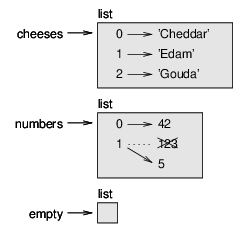
| Figure 9.1: State diagram. |
This chapter presents one of Python’s most useful built-in types, lists. You will also learn more about objects and what can happen when you have more than one name for the same object.
Like a string, a list is a sequence of values. In a string, the
values are characters; in a list, they can be any type. The values in
a list are called elements or sometimes items.
There are several ways to create a new list; the simplest is to
enclose the elements in square brackets ([ and ]):
[10, 20, 30, 40]
['crunchy frog', 'ram bladder', 'lark vomit']
The first example is a list of four integers. The second is a list of three strings. The elements of a list don’t have to be the same type. The following list contains a string, a float, an integer, and (lo!) another list:
['spam', 2.0, 5, [10, 20]]
A list within another list is said to be nested.
A list that contains no elements is
called an empty list; you can create one with empty
brackets, [].
As you might expect, you can assign list values to variables:
>>> cheeses = ['Cheddar', 'Edam', 'Gouda']
>>> numbers = [42, 123]
>>> empty = []
>>> print(cheeses, numbers, empty)
['Cheddar', 'Edam', 'Gouda'] [42, 123] []
'mutable' means that the values in a list can be changed in memory.
The syntax for accessing the elements of a list is the same as for accessing the characters of a string—the bracket operator. The expression inside the brackets specifies the index. Remember that the indices start at 0:
>>> cheeses[0]
'Cheddar'
Unlike strings, lists are mutable. When the bracket operator appears on the left side of an assignment, it identifies the element of the list that will be assigned.
>>> numbers = [42, 123]
>>> numbers[1] = 5
>>> numbers
[42, 5]
The one-eth element of numbers, which used to be 123, is now 5.
Figure 9.1 shows the state diagram for cheeses, numbers and empty:
Figure 9.1: State diagram.
In the figure above, lists are represented by boxes with the word “list” outside and the elements of the list inside. cheeses refers to a list with three elements indexed 0, 1 and 2. numbers contains two elements; the diagram shows that the value of the second element has been reassigned from 123 to 5. empty refers to a list with no elements.
List indices work the same way as string indices:
The in operator also works on lists.
>>> cheeses = ['Cheddar', 'Edam', 'Gouda']
>>> 'Edam' in cheeses
True
>>> 'Brie' in cheeses
False
The most common way to traverse the elements of a list is with a for loop. The syntax is the same as for strings:
for cheese in cheeses:
    print(cheese)
This works well if you only need to read the elements of the
list. But if you want to write or update the elements, you
need the indices. A common way to do that is to combine
the built-in functions range and len:
for i in range(len(numbers)):
    numbers[i] = numbers[i] * 2
This loop traverses the list and updates each element. len
returns the number of elements in the list. range returns
a list of indices from 0 to n−1, where n is the length of
the list. Each time through the loop i gets the index
of the next element. The assignment statement in the body uses
i to read the old value of the element and to assign the
new value.
A for loop over an empty list never runs the body:
for x in []:
    print('This never happens.')
Although a list can contain another list, the nested list still counts as a single element. The length of this list is four:
['spam', 1, ['Brie', 'Roquefort', 'Pol le Veq'], [1, 2, 3]]
The + operator concatenates lists:
>>> a = [1, 2, 3]
>>> b = [4, 5, 6]
>>> c = a + b
>>> c
[1, 2, 3, 4, 5, 6]
The * operator repeats a list a given number of times:
>>> [0] * 4
[0, 0, 0, 0]
>>> [1, 2, 3] * 3
[1, 2, 3, 1, 2, 3, 1, 2, 3]
The first example repeats [0] four times. The second example repeats the list [1, 2, 3] three times.
The slice operator also works on lists:
>>> t = ['a', 'b', 'c', 'd', 'e', 'f']
>>> t[1:3]
['b', 'c']
>>> t[:4]
['a', 'b', 'c', 'd']
>>> t[3:]
['d', 'e', 'f']
If you omit the first index, the slice starts at the beginning. If you omit the second, the slice goes to the end. So if you omit both, the slice is a copy of the whole list.
>>> t[:]
['a', 'b', 'c', 'd', 'e', 'f']
Since lists are mutable, it is often useful to make a copy before performing operations that modify lists.
A slice operator on the left side of an assignment can update multiple elements:
>>> t = ['a', 'b', 'c', 'd', 'e', 'f']
>>> t[1:3] = ['x', 'y']
>>> t
['a', 'x', 'y', 'd', 'e', 'f']
Python provides methods that operate on lists. For example, append adds a new element to the end of a list:
>>> t = ['a', 'b', 'c']
>>> t.append('d')
>>> t
['a', 'b', 'c', 'd']
sort arranges the elements of the list from low to high:
>>> t = ['d', 'c', 'e', 'b', 'a']
>>> t.sort()
>>> t
['a', 'b', 'c', 'd', 'e']
Most list methods are void; they modify the list and return None. If you accidentally write t = t.sort(), you will be disappointed with the result.
This reading was modified by Timothy M. Urness in 2021 and presented under the same license in order to better serve the students of CS 65 at Drake University.