
Hash Table Data Structure, Implementing Set and Map ADTs
CS 66: Introduction to Computer Science II
References for this lecture
Problem Solving with Algorithms and Data Structures using Python
Section 6.5 https://runestone.academy/ns/books/published/pythonds/SortSearch/Hashing.html
Review: Hash Tables
Hash tables work like the above approach, except it allows for values outside of indices of the table using a hash function.
Hash functions can be any function that transforms a value into a suitable index for the list.
For example:
hash_table_size = 10
hash_table = [None] * 10 #initialize all 10 spots to None

def simple_hash(value,num_items):
    return value % num_items

print("Initialized table;",hash_table)

#putting the value 87 into the hash table
hash_table[ simple_hash(87,hash_table_size) ] = 87
#putting the value 1004 into the hash table
hash_table[ simple_hash(1004,hash_table_size) ] = 1004

print("The hash table with some data in it")
print(hash_table)
Initialized table; [None, None, None, None, None, None, None, None, None, None]
The hash table with some data in it
[None, None, None, None, 1004, None, None, 87, None, None]
Group Activity Problem 1 (Review)
What line of code would I use to check if a number like 87 or 63 or 37 is in the hash table? What is the Big O of this?
Review: Collisions
When two different items end up with the same hash value, it is called a collision.
This is a problem since both items can’t occupy the same memory location.
Collision Resolution is the process of finding a new location for an item when there is a collision.
Linear Probing
Linear probing: collision resolution strategy - put the item in the next available spot.
Let’s see what would happen if we put the following items into our hash table of size 10:
13, 56, 193, 84, 73, 264
Group Activity Problem 2 - a bigger example
Make a copy of this spreadsheet and put the following numbers into the hash table:
https://docs.google.com/spreadsheets/d/11hRzwujbkeBGmGGDXgaZrExLDNBN7_dM5Y1X25nmJcU/edit?usp=sharing
157, 345, 206, 721, 300, 111, 897, 66, 578, 416, 126
Answer the following question:
- What are some ways we make collisions less likely?
- What problem do you run into if you try to remove items from the table?
Rehashing
Rehashing: use another function to find a new spot when a collision happens
-
linear probing is a case of rehashinig
-
skip n - instead of jumping to next slot, skip down $n$ slots and try it there.
skip 3: if the original hash value was $h$, then try $h+3$, then $h+6$, then $h+9$, then $h+12$ (wrap around the table as necessary)
Let’s try skip 3 with 13, 56, 193, 84, 73, 264
Problem: hash table size should be a prime number so that you eventually get to all slots in the table, still results in some clustering
-
quadratic probing - increase the skip value each time by the next square number
if the original hash value was $h$, then try $h+1$, then $h+4$, then $h+9$, then $h+16$ (wrap around the table as necessary)
-
PRNG probing - use a pseudo-random number generator to generate the probing sequence (this is what Python uses for sets and dicionaries)
ALl of these techniques that try to find open slot somewhere else in the table are called open addressing
Chaining
Chaining: A collision resolution strategy in which values are placed into a linked list referenced by each spot in the hash table
Eliminates clustering!
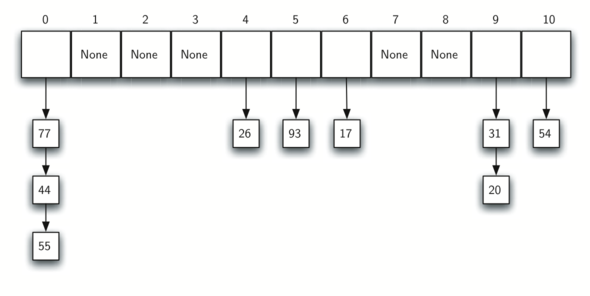
Let’s try chaining with 13, 56, 193, 84, 73, 264
Hash Tables as a Data Structure
Hash Tables
- don’t guarantee any particular ordering - it all depends on what the hash function does
- bad for ADTs that have order or indexes:
UnorderedList,OrderedList,Queue,Stack,Deque - good for ADTs where order doesn’t matter:
MapandSet
Set ADT
The above examples consider using hash tables as the underlying data structure to implement a set abstract data type - similar to Python’s set type.
- A set is a collection in which the ordering of the values is not important
- The only thing that matters with a set is whether the item is in the set or not
- Duplicates are not allowed
- Python has a built-in set type
The book does not formally define the Set ADT, but we could define it like this:
Set()Create a new, empty set. It returns an empty set collection.add(val)Add a new value to the set. If the value is already in the set, do nothing.inReturn True for a statement of the formval in set, if the given value is in the set, False otherwise.remove(val)Remove the given value from the set.len()Return the number of values stored in the set.
items_in_my_fridge = {"milk","eggs","leftovers","pop"}
items_in_my_fridge.add("butter")
items_in_my_fridge.add("butter")
items_in_my_fridge.remove("pop")
print( type(items_in_my_fridge) )
print(items_in_my_fridge)
print( "butter" in items_in_my_fridge )
print( "pop" in items_in_my_fridge )
<class 'set'>
{'butter', 'eggs', 'leftovers', 'milk'}
True
False
Implementing the Set ADT with a Chained Hash Table as the underlying data structure
Coding demo
# Example code for your notes

class ChainedHashSet:

    def __init__(self,table_size=10):
        self.table = []
        self.table_size = table_size
        for slot in range(self.table_size):
            self.table.append([])

    def __repr__(self):
        display_str = ""
        for slot in range(self.table_size):
            display_str += str(slot)+":"+str(self.table[slot])+"\n"
        return display_str

    def hash_function(self,item):
        return item%self.table_size

    def add(self,item):
        hashed_val = self.hash_function(item)
        list_at_slot = self.table[ hashed_val ]
        if not item in list_at_slot:
            list_at_slot.append(item)


my_set = ChainedHashSet()

my_set.add(13)
my_set.add(56)
my_set.add(193)
my_set.add(84)
my_set.add(73)
my_set.add(264)


print(my_set)
0:[]
1:[]
2:[]
3:[13, 193, 73]
4:[84, 264]
5:[]
6:[56]
7:[]
8:[]
9:[]
Group Activity Problem 3
Implement the __contains__ method - which will allow you to use the in operator to check if an item is in the set.
Note: it should return True or False
Group Activity Problem 4
Our hash table will still only store integers.
Can you think of a strategy that will allow us to put strings in a table?
0:[]
1:[]
2:[]
3:['Dr. Mario']
4:[]
5:['Pikachu', 'Kirby']
6:['Sheik', 'Mr. Game and Watch']
7:['Dr. Carlson', 'Jiggly Puff']
8:['Captain Falcon']
9:['Mew Two']
these are the names my kids gave our chicks that just hatched
Map ADT
Hash tables are also often used to implement the map abstract data type
A map abstract data type stores key-value pairs and allows you to use a key to look up its associated value.
A Python dictionary is a map.
There are other data structures you could use to implement a map, such as a list of tuples.
The following is the book’s definition of the Map ADT:
Map()Create a new, empty map. It returns an empty map collection.put(key,val)Add a new key-value pair to the map. If the key is already in the map then replace the old value with the new value.get(key)Given a key, return the value stored in the map orNoneotherwise.delDelete the key-value pair from the map using a statement of the formdel map[key].len()Return the number of key-value pairs stored in the map.inReturn True for a statement of the form key in map, if the given key is in the map, False otherwise.
Chained Hash Map
We could use a similar strategy that we used for set, but store (key,value) tuples
0:[(20, 'chicken')]
1:[(31, 'cow')]
2:[]
3:[(93, 'lion')]
4:[(54, 'cat'), (44, 'goat')]
5:[(55, 'pig')]
6:[(26, 'dog')]
7:[(17, 'tiger'), (77, 'bird')]
8:[]
9:[]
(maybe this is a map that a zoo uses to look up which animal has each id)
Group Activity Problem 5
With our set, we did something like this
    def add(self,item):
        hashed_val = self.hash_function(item)
        list_at_slot = self.table[ hashed_val ]
        if not item in list_at_slot:
            list_at_slot.append(item)
For a map, it would look like this
    def put(self,key,value):
        hashed_key = self.hash_function(key)
        list_at_slot = self.table[ hashed_key ]
        if not (key,value) in list_at_slot:
            list_at_slot.append((key,value))
What would happend if you tried to change the value associate with a key?
How can you fix it?
my_map = ChainedHashMap()

my_map.put(20,"Turkey")
my_map.put(20,"Chicken") #should overwrite Turkey
Built-in Hash Function
Python contains a built-in hash function that you can use.
Be careful, the hash is somewhat randomized and values change every time you re-start your code (this brings issues with saving hashed values to a file, etc.)
print( hash("Star Wars: Episode VII - The Force Awakens (2015)") )
1538015278275964211
Textbook’s Linear-Probed-Hash-Table Map
The following code shows the start of the book’s approach to using a Hash Table with linear probing to implement a map.
self.slots list stores the keys
self.data stores the associated values
class HashTable:
    def __init__(self):
        self.size = 11
        self.slots = [None] * self.size
        self.data = [None] * self.size

    def put(self,key,data):
        hashvalue = self.hashfunction(key,len(self.slots))

        if self.slots[hashvalue] == None:
            self.slots[hashvalue] = key
            self.data[hashvalue] = data
        else:
            if self.slots[hashvalue] == key:
                self.data[hashvalue] = data  #replace
            else:
                nextslot = self.rehash(hashvalue,len(self.slots))
            while self.slots[nextslot] != None and self.slots[nextslot] != key:
                nextslot = self.rehash(nextslot,len(self.slots))

            if self.slots[nextslot] == None:
                self.slots[nextslot]=key
                self.data[nextslot]=data
            else:
                self.data[nextslot] = data #replace

    def hashfunction(self,key,size):
         return key%size

    def rehash(self,oldhash,size):
        return (oldhash+1)%size