
Linked Lists
References for this lecture
Problem Solving with Algorithms and Data Structures using Python
Section 3.6 (Big O of list operations): https://runestone.academy/ns/books/published/pythonds/AlgorithmAnalysis/Lists.html
Section 4.5, 4.6 (Stack implementation), 4.19-4.23: https://runestone.academy/ns/books/published/pythonds/BasicDS/toctree.html
Group Activity Problem 1
Review: We’ve seen the textbook’s description of the Stack ADT. Here it is.
These are the following operations that all stacks should have:
Stack()creates a new stack that is empty. It needs no parameters and returns an empty stack.push(item)adds a new item to the top of the stack. It needs the item and returns nothing.pop()removes the top item from the stack. It needs no parameters and returns the item. The stack is modified.peek()returns the top item from the stack but does not remove it. It needs no parameters. The stack is not modified.isEmpty()tests to see whether the stack is empty. It needs no parameters and returns a boolean value.size()returns the number of items on the stack. It needs no parameters and returns an integer.
Create a class that implements this. It should be very similar to the Queue class from last time.
Group Activity Problem 2
What is the Big O of each of the following for your definition of a Stack?
pushpoppeeksize
How does this compare to the Queue we made last time?
Group Activity Problem 3
Discuss the following question, and make sure to write the answer in your notes: What is the difference between and Abstract Data Type and a Data Structure?
Linked List vs. Array Philosophy
A list can be implemented using either an array-based or link-based data structure.
The Python list type is implmented as an array. An array keeps track of the data in consecutive memory locations
(here is a blank memory diagram that we may draw on in the lecture)

A linked list allows each item to be anywhere in the computer’s memory. It allocates enough space for only one item at a time, and each one keeps track of where the next one is in memory.
A picture of a linked list
Linked lists are often drawn like this. Let’s talk about what these symbols mean.
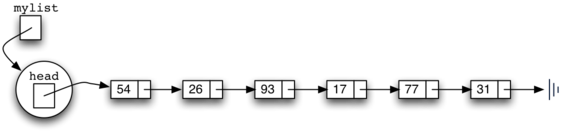
A class for representing a node in a linked list
A linked list node has two attributes, the data it holds and a reference to the next node in the list.
Here is the Node class presented in the textbook.
class Node:
    def __init__(self,initdata):
        self.data = initdata
        self.next = None

    def getData(self):
        return self.data

    def getNext(self):
        return self.next

    def setData(self,newdata):
        self.data = newdata

    def setNext(self,newnext):
        self.next = newnext
Let’s create some nodes and practice setting them up as a linked list.
a = Node("A")
b = Node("B")
c = Node("C")

print("a:",a,"a's data:",a.getData(),", next:",a.getNext())
print("b:",b,"b's data:",b.getData(),", next:",b.getNext())
print("c:",c,"c's data:",c.getData(),", next:",c.getNext())

a.setNext(b)
b.setNext(c)

print("a:",a,"a's data:",a.getData(),", next:",a.getNext())
print("b:",b,"b's data:",b.getData(),", next:",b.getNext())
print("c:",c,"c's data:",c.getData(),", next:",c.getNext())
a: <__main__.Node object at 0x1106e6ce0> a's data: A , next: None
b: <__main__.Node object at 0x1106e7ac0> b's data: B , next: None
c: <__main__.Node object at 0x1106e6a70> c's data: C , next: None
a: <__main__.Node object at 0x1106e6ce0> a's data: A , next: <__main__.Node object at 0x1106e7ac0>
b: <__main__.Node object at 0x1106e7ac0> b's data: B , next: <__main__.Node object at 0x1106e6a70>
c: <__main__.Node object at 0x1106e6a70> c's data: C , next: None
An Unordered List Data Structure based on a Linked List
We previously looked at the UnorderedList ADT:
List()creates a new list that is empty. It needs no parameters and returns an empty list.add(item)adds a new item to the list. It needs the item and returns nothing. Assume the item is not already in the list.remove(item)removes the item from the list. It needs the item and modifies the list. Assume the item is present in the list.search(item)searches for the item in the list. It needs the item and returns a boolean value.isEmpty()tests to see whether the list is empty. It needs no parameters and returns a boolean value.size()returns the number of items in the list. It needs no parameters and returns an integer.append(item)adds a new item to the end of the list making it the last item in the collection. It needs the item and returns nothing. Assume the item is not already in the list.index(item)returns the position of item in the list. It needs the item and returns the index. Assume the item is in the list.insert(pos,item)adds a new item to the list at position pos. It needs the item and returns nothing. Assume the item is not already in the list and there are enough existing items to have position pos.pop()removes and returns the last item in the list. It needs nothing and returns an item. Assume the list has at least one item.pop(pos)removes and returns the item at position pos. It needs the position and returns the item. Assume the item is in the list.
We also talked about how the built-in Python list type is a pretty good match for this.
Now, we will implement the ADT as a linked list - following Section 4.21 in the book
class UnorderedList:

    def __init__(self):
        self.head = None

    def isEmpty(self):
        return self.head == None

    #this method is really a prepend - it puts the new node at the beginning
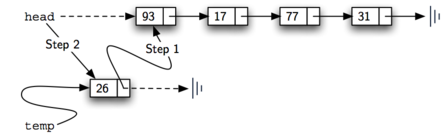
    def add(self,item):
        temp = Node(item)
        temp.setNext(self.head)
        self.head = temp
my_list = UnorderedList()
print(my_list.isEmpty())

my_list.add(31)
my_list.add(77)
my_list.add(17)
my_list.add(93)
my_list.add(26)
print(my_list.isEmpty())
True
False
Traversing a linked list
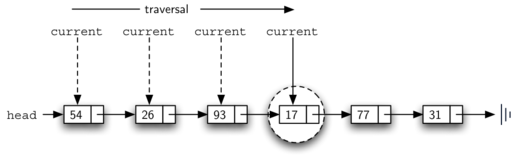
Some of the operations you need to perform with a linked list require you to traverse (i.e., loop over) all/many items in the list.
For example, if I wanted to display each item in a list, I could do it with a loop as in the display() method below:
we’re going to add on to the book example
class UnorderedList:

    def __init__(self):
        self.head = None

    def isEmpty(self):
        return self.head == None

    #this method is really a prepend - it puts the new node at the beginning
    def add(self,item):
        temp = Node(item)
        temp.setNext(self.head)
        self.head = temp

    def display(self):
        current = self.head #start with the Node at the head
        while current: #this will keep going until current equals None
            print(current.getData()) #display the current Node's data
            current = current.getNext() #move on to the next Node in the list
my_list = UnorderedList()

my_list.add(31)
my_list.add(77)
my_list.add(17)
my_list.add(93)
my_list.add(26)
my_list.add(54)
my_list.display()
54
26
93
17
77
31
Let’s do it with __repr__ instead
class UnorderedList:

    def __init__(self):
        self.head = None

    def isEmpty(self):
        return self.head == None

    #this method is really a prepend - it puts the new node at the beginning
    def add(self,item):
        temp = Node(item)
        temp.setNext(self.head)
        self.head = temp

    def __repr__(self):
        list_representation = ""
        current = self.head #start with the Node at the head
        while current: #this will keep going until current equals None
            list_representation += str(current.getData())+" -> "
            current = current.getNext() #move on to the next Node in the list
        list_representation += "None" #the last one in the list points to None
        return list_representation

my_list = UnorderedList()

my_list.add(31)
my_list.add(77)
my_list.add(17)
my_list.add(93)
my_list.add(26)
my_list.add(54)
print(my_list)
54 -> 26 -> 93 -> 17 -> 77 -> 31 -> None
Traversing to get an item by its index
If you want to get an item by its index, you need to traverse the list and count until you find it.
Note: This is not one of the methods that is listed in the ADT, but I think it is ok to allow it since it’s something that you can do with a built-in Python list.
class UnorderedList:

    def __init__(self):
        self.head = None

    def isEmpty(self):
        return self.head == None

    #this method is really a prepend - it puts the new node at the beginning
    def add(self,item):
        temp = Node(item)
        temp.setNext(self.head)
        self.head = temp

    def __repr__(self):
        list_representation = ""
        current = self.head #start with the Node at the head
        while current: #this will keep going until current equals None
            list_representation += str(current.getData())+" -> "
            current = current.getNext() #move on to the next Node in the list
        list_representation += "None" #the last one in the list points to None
        return list_representation

    def get(self,index):

        if index < 0:
            raise Exception("list index "+str(index)+" is out of range")

        current = self.head
        item_counter = 0

        while current and item_counter < index:

            current = current.getNext()
            item_counter += 1

        if current == None:
            raise Exception("list index "+str(index)+" is out of range")

        return current.getData()

my_list = UnorderedList()

my_list.add(31)
my_list.add(77)
my_list.add(17)
my_list.add(93)
my_list.add(26)
my_list.add(54)
print(my_list)

print(my_list.get(3))

print(my_list.get(5))
54 -> 26 -> 93 -> 17 -> 77 -> 31 -> None
17
31
The __getitem__ magic method
And we can instead implement __getitem__ in place of our get method, which will allow us to use [ ] notation instead
class UnorderedList:

    def __init__(self):
        self.head = None

    def isEmpty(self):
        return self.head == None

    #this method is really a prepend - it puts the new node at the beginning
    def add(self,item):
        temp = Node(item)
        temp.setNext(self.head)
        self.head = temp

    def __repr__(self):
        list_representation = ""
        current = self.head #start with the Node at the head
        while current: #this will keep going until current equals None
            list_representation += str(current.getData())+" -> "
            current = current.getNext() #move on to the next Node in the list
        list_representation += "None" #the last one in the list points to None
        return list_representation

    def __getitem__(self,index):

        if index < 0:
            raise Exception("list index "+str(index)+" is out of range")

        current = self.head
        item_counter = 0

        while current and item_counter < index:

            current = current.getNext()
            item_counter += 1

        if current == None:
            raise Exception("list index "+str(index)+" is out of range")

        return current.getData()

my_list = UnorderedList()

my_list.add(31)
my_list.add(77)
my_list.add(17)
my_list.add(93)
my_list.add(26)
my_list.add(54)
print(my_list)

print(my_list[3])

print(my_list[5])
54 -> 26 -> 93 -> 17 -> 77 -> 31 -> None
17
31
Group Activity Problem 4
Note that the ADT description includes a search operation. Add this to your UnorderedList class.
Hint: You will need to do a traversal like with get, but you’re going to be looking for a value in the list that matches your item.
Hint 2: You can find a solution to this exercise in the book: https://runestone.academy/ns/books/published/pythonds/BasicDS/ImplementinganUnorderedListLinkedLists.html
It should work with code like this:
my_list = UnorderedList()

my_list.add(31)
my_list.add(77)
my_list.add(17)
my_list.add(93)
my_list.add(26)
my_list.add(54)
print(my_list)

print( my_list.search(17) ) #should print True
print( my_list.search(34) ) #should print False
Group Activity Problem 5
Create a method called __contains__ that otherwise is the same as your search method.
This allow you to write code as below. Discuss in your group what the difference is between these two approaches.
my_list = UnorderedList()

my_list.add(31)
my_list.add(77)
my_list.add(17)
my_list.add(93)
my_list.add(26)
my_list.add(54)
print(my_list)

print( 17 in my_list ) #should print True
print( 34 in my_list ) #should print False
Group Activity Problem 6
What is the Big O of get/__getitem__ and search/__contains__?
Group Activity Problem 7
What things from the ADT do we still have left to implement? Write down a to-do list.
Group Activity Problem 8
Take a look at the implementation of the size method in the book (https://runestone.academy/ns/books/published/pythonds/BasicDS/ImplementinganUnorderedListLinkedLists.html). What is the Big O of that approach?
Group Activity Problem 9
I claim that it is possible to do size in $O(1)$ time. Discuss ideas for how you might pull that off.
Group Activity Problem 10
Come up with a strategy for how you would implement append - just describe the approach, you don’t actually have to code it up. What would the Big O of that approach be? Can you think of any ways to improve it?
Group Activity Problem 11
How do the complexities of the methods we’ve discussed so far compare with the complexities of Python lists (https://runestone.academy/ns/books/published/pythonds/AlgorithmAnalysis/Lists.html )? Which things are the same? Which things are Python lists better at? Which things are linked lists better at?