
Abstract Data Types
References for this lecture
Why Study Data Structures and Abstract Data Types? Problem Solving with Algorithms and Data Structures using Python, Section 1.5: https://runestone.academy/ns/books/published/pythonds/Introduction/WhyStudyDataStructuresandAbstractDataTypes.html
The Unordered List Abstract Data Type Problem Solving with Algorithms and Data Structures using Python, Section 4.20: https://runestone.academy/ns/books/published/pythonds/BasicDS/TheUnorderedListAbstractDataType.html
Implementing the Map Abstract Data Type Problem Solving with Algorithms and Data Structures using Python, Section 6.5.3: https://runestone.academy/ns/books/published/pythonds/SortSearch/Hashing.html#implementing-the-map-abstract-data-type
The Stack Abstract Data Type Problem Solving with Algorithms and Data Structures using Python, Section 4.4: https://runestone.academy/ns/books/published/pythonds/BasicDS/TheStackAbstractDataType.html
The Queue Abstract Data Type Problem Solving with Algorithms and Data Structures using Python, Section 4.11: https://runestone.academy/ns/books/published/pythonds/BasicDS/TheQueueAbstractDataType.html
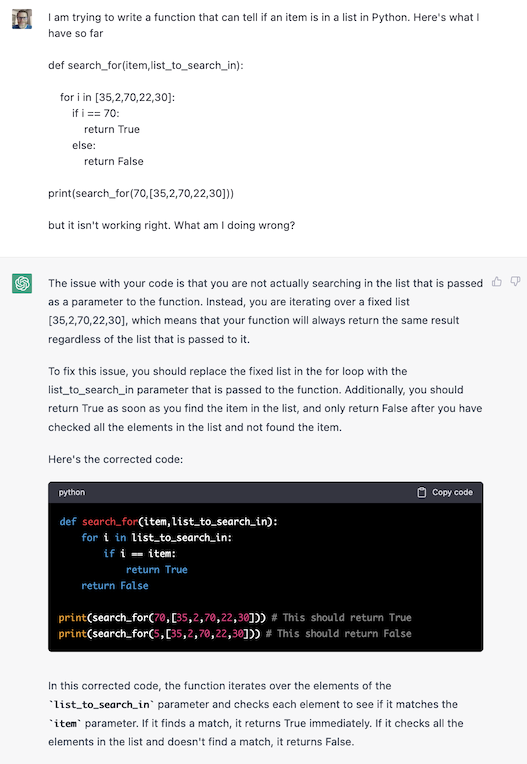
A ChatGPT Example
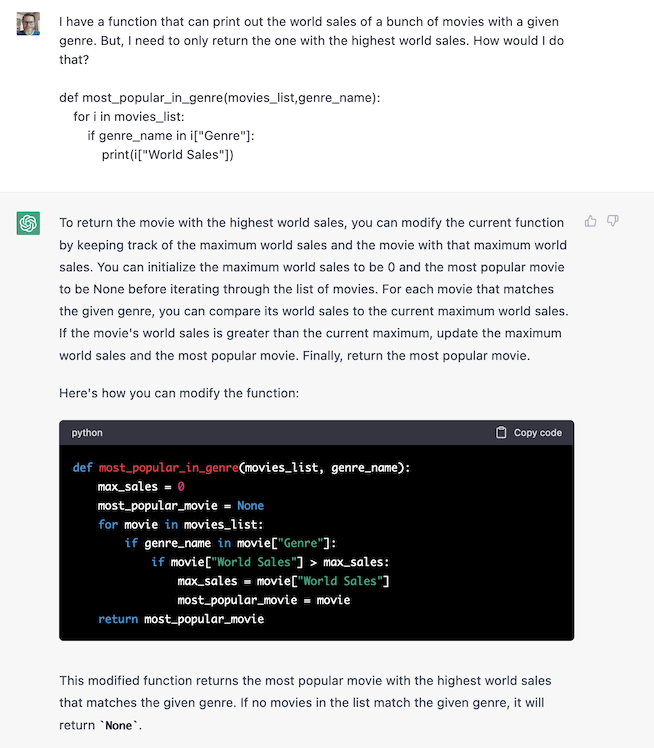
Another ChatGPT Example
Hy-Vee Internship Announcement
https://analytics.drake.edu/~manley/CS66/Spring2023/assets/images/Drake-HyVeeInternship2023.pdf
Abstract Data Types
Definition from the textbook:
An abstract data type, sometimes abbreviated ADT, is a logical description of how we view the data and the operations that are allowed without regard to how they will be implemented.
Let’s break this down:
- logical description of … data and the operations: it tells you…
- what the data type should do
- how it will behave
- what kind of methods you can call on it
- without regard to how they will be implemented: there are many ways we could write the class…
- all behave the same way -
- all would have the same methods
- internally could be organized differently
- some might be faster, slower, or take more/less memory (could vary from method to method)
Unordered List ADT
The textbook definition of unordered list
- collection of items
- items have position
- items are not sorted
(a list that automatically stays sorted is called an ordered list)
Here’s how they define the unordered list operations:
List()creates a new list that is empty. It needs no parameters and returns an empty list.add(item)adds a new item to the list. It needs the item and returns nothing. Assume the item is not already in the list.remove(item)removes the item from the list. It needs the item and modifies the list. Assume the item is present in the list.search(item)searches for the item in the list. It needs the item and returns a boolean value.isEmpty()tests to see whether the list is empty. It needs no parameters and returns a boolean value.size()returns the number of items in the list. It needs no parameters and returns an integer.append(item)adds a new item to the end of the list making it the last item in the collection. It needs the item and returns nothing. Assume the item is not already in the list.index(item)returns the position of item in the list. It needs the item and returns the index. Assume the item is in the list.insert(pos,item)adds a new item to the list at position pos. It needs the item and returns nothing. Assume the item is not already in the list and there are enough existing items to have position pos.pop()removes and returns the last item in the list. It needs nothing and returns an item. Assume the list has at least one item.pop(pos)removes and returns the item at position pos. It needs the position and returns the item. Assume the item is in the list.
Let’s take operations one by one and see examples of how Python’s built-in list type could meet this description
List() creates a new list that is empty. It needs no parameters and returns an empty list.
my_list = [] #creates an empty list
add(item) adds a new item to the list. It needs the item and returns nothing. Assume the item is not already in the list.
Assumption: I think they mean the new item goes into the front of the list
my_list = [1,2,3,4,5]
item = 10
my_list.insert(0,item) #adds it to the beginning of the list
print(my_list)
[10, 1, 2, 3, 4, 5]
remove(item) removes the item from the list. It needs the item and modifies the list. Assume the item is present in the list.
item = 4
my_list.remove(item) #this one matches exactly
print(my_list)
[10, 1, 2, 3, 5]
search(item) searches for the item in the list. It needs the item and returns a boolean value.
my_list = [10, 1, 2, 3, 5]
item = 3
print( item in my_list)
True
isEmpty() tests to see whether the list is empty. It needs no parameters and returns a boolean value.
my_list = [10, 1, 2, 3, 5]
print( my_list == [] )
False
size() returns the number of items in the list. It needs no parameters and returns an integer.
print( len(my_list) )
5
append(item) adds a new item to the end of the list making it the last item in the collection. It needs the item and returns nothing. Assume the item is not already in the list.
my_list = [10, 1, 2, 3, 5]
item = 42
my_list.append(item) #works exactly like the description
print(my_list)
[10, 1, 2, 3, 5, 42]
index(item) returns the position of item in the list. It needs the item and returns the index. Assume the item is in the list.
my_list = [10, 1, 2, 3, 5, 42]
item = 3
print( my_list.index(item) ) #works exactly like the description
3
insert(pos,item) adds a new item to the list at position pos. It needs the item and returns nothing. Assume the item is not already in the list and there are enough existing items to have position pos.
my_list = my_list = [10, 1, 2, 3, 5, 42]
item = 88
pos = 2
my_list.insert(pos,item) #works exactly like the description
print(my_list)
[10, 1, 88, 2, 3, 5, 42]
pop() removes and returns the last item in the list. It needs nothing and returns an item. Assume the list has at least one item.
my_list = my_list = [10, 1, 2, 3, 5, 42]
print(my_list.pop()) #works exactly like the description
print(my_list)
42
[10, 1, 2, 3, 5]
pop(pos) removes and returns the item at position pos. It needs the position and returns the item. Assume the item is in the list.
my_list = [10, 1, 88, 2, 3, 5]
print(my_list.pop(3)) #works exactly like the description
print(my_list)
2
[10, 1, 88, 3, 5]
Later, we’ll see how to create a class to define a new type where we can implement the this ADT description exactly as it is written.
Map ADT
A map is a data type that stores key-value pairs - use the key to look up a data value
The textbook describes the map as
Map()Create a new, empty map. It returns an empty map collection.put(key,val)Add a new key-value pair to the map. If the key is already in the map then replace the old value with the new value.get(key)Given a key, return the value stored in the map orNoneotherwise.delDelete the key-value pair from the map using a statement of the formdel map[key].len()Return the number of key-value pairs stored in the map.inReturnTruefor a statement of the formkey in map, if the given key is in the map,Falseotherwise.
Group Activity Problem 1
Give examples that show how a Python dictionary meets this definition of a map.
Queue
A Queue is an abstract data type (ADT) which provides First-In, First-Out access to a collection of objects.

Queue uses
Stacks are useful for solving many different kinds of problems
- Real-world lines, restaurant software for serving customers, etc.
- Scheduling computing resources (e.g., print queue, processes waiting for CPU, etc.)
Queue Operations
These are the following operations that all queues should have:
Queue()creates a new queue that is empty. It needs no parameters and returns an empty queue.enqueue(item)adds a new item to the back of the queue. It needs the item and returns nothing.dequeue()removes the item at the front of the queue. It needs no parameters and returns the item. The queue is modified.isEmpty()tests to see whether the queue is empty. It needs no parameters and returns a boolean value.size()returns the number of items in the queue. It needs no parameters and returns an integer.
Variant: fixed-size
Some queues might have a limited number of spots, so you might also have an isFull() method.
Example
Let’s see how a queue changes as we perform some of these operations.
First, install the pythonds module, which has implementations for many of the ADTs from the textbook.
python3 -m pip install pythonds
from pythonds.basic import Queue

the_queue = Queue()

the_queue.isEmpty()
the_queue.enqueue("A")
the_queue.enqueue("B")
the_queue.size()
the_queue.enqueue("C")
the_queue.dequeue()
the_queue.enqueue("D")
the_queue.enqueue("E")
the_queue.isEmpty()
the_queue.size()
the_queue.dequeue()
the_queue.dequeue()
the_queue.dequeue()
the_queue.enqueue("F")
the_queue.size()
Group Activity Problem 2
Before running the code below, manually step through it line by line and write down what values are in the queue.
What do you think will be printed by this code?
After you have come to an agreement, run the code and see if you were right.
from pythonds.basic import Queue

my_q = Queue()
my_q.enqueue(4)
my_q.enqueue(7)
my_q.enqueue(11)
my_q.dequeue()
my_q.enqueue(8)
my_q.dequeue()
my_q.enqueue(5)
my_q.enqueue(9)

print("Size:",my_q.size())

while not my_q.isEmpty():
    print(my_q.dequeue())
Stacks
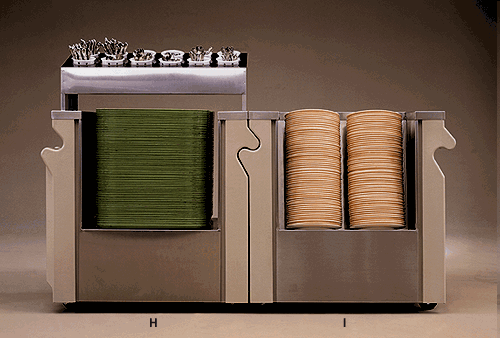
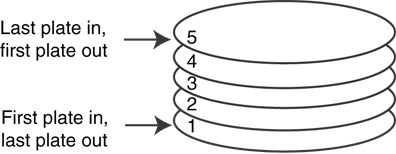
A Stack is an abstract data type (ADT) which provides Last-In, First-Out access to a collection of objects.


Stack uses
Stacks are useful for solving many different kinds of problems
- Real-world objects (e.g., deck of cards, etc.)
- Parsing nested structures (e.g., matching parentheses, html tags, etc.)
- Keeping track of nested function calls
Stack Operations
These are the following operations that all stacks should have:
Stack()creates a new stack that is empty. It needs no parameters and returns an empty stack.push(item)adds a new item to the top of the stack. It needs the item and returns nothing.pop()removes the top item from the stack. It needs no parameters and returns the item. The stack is modified.peek()returns the top item from the stack but does not remove it. It needs no parameters. The stack is not modified.isEmpty()tests to see whether the stack is empty. It needs no parameters and returns a boolean value.size()returns the number of items on the stack. It needs no parameters and returns an integer.
Example
Let’s see how a stack changes as we perform some of these operations.
from pythonds.basic import Stack

the_stack = Stack()
the_stack.isEmpty()
the_stack.push("A")
the_stack.push("B")
the_stack.size()
the_stack.push("C")
the_stack.pop()
the_stack.peek()
the_stack.push("D")
the_stack.push("E")
the_stack.isEmpty()
the_stack.size()
the_stack.pop()
the_stack.pop()
the_stack.pop()
the_stack.push("F")
the_stack.size()
Group Activity Problem 3
Before running the code below, manually step through it line by line and write down what values are in the queue.
What do you think will be printed by this code?
After you have come to an agreement, run the code and see if you were right.
from pythonds.basic import Stack

my_stk = Stack()
my_stk.push(4)
my_stk.push(7)
my_stk.push(11)
my_stk.pop()
my_stk.push(8)
my_stk.pop()
my_stk.push(5)
my_stk.push(9)

print("Size:",my_stk.size())

while not my_stk.isEmpty():
    print(my_stk.pop())
Example Application: reverse
We can use a stack to reverse a string.
- Scanning the string from left-to-right, push each character
- Pop each character, adding it onto an accumulator string until the stack is empty
from pythonds.basic import Stack

def reverse_string(astring):

    char_stack = Stack()

    for char in astring:
        char_stack.push(char)

    rev_astring = ""

    while not char_stack.isEmpty():
        rev_astring += char_stack.pop()

    return rev_astring

print(reverse_string("this is a test"))
Example Application: Matching parentheses
We can use a stack to check for matched sets of parentheses.
Some test cases
correctly matched:
"Here is a profound message (plus some less profound words (which are in parentheses))"
"(()(()))"
"(()()()())"
"(((())))"
"(()((())()))"
not matched:
"Here is a profound message (plus some less profound words (which are in parentheses)"
"()(()()"
"((((((())"
"()))"
"(()()(()"
def check_parens(astring):

    paren_stack = Stack()

    #checking each character in the string
    for char in astring:

        if char == "(":
            paren_stack.push(char)

        elif char == ")":
            if paren_stack.isEmpty():
                return False #there's no ( to match this )
            else:
                paren_stack.pop()

    if paren_stack.isEmpty():
        return True #all parens matched
    else:
        return False #there is an extra ( that was unmatched

print( check_parens("(()(()))") )