
JSON and Web APIs
References for this lecture
Problem Solving with Algorithms and Data Structures using Python, Section 1.8: https://runestone.academy/ns/books/published//pythonds/Introduction/GettingStartedwithData.html
Also see Chapter 11 of Think Python ( https://greenteapress.com/thinkpython2/html/thinkpython2012.html )
Requests module user’s guide: https://docs.python-requests.org/en/latest/
Group Activity Problem 1
Download the file HighestGrossingMovies.json and put it in the folder where you normally keep your .py files. The data in this file is originally from here (though I restructured it for use in this course): https://www.kaggle.com/sanjeetsinghnaik/top-1000-highest-grossing-movies
Open the file in a plain text editor (e.g., notepad, textedit, or even VS Code) and look at what the contents of the file look like. In your group, discuss what kind of data you see in this file.
Then create a .py on your computer with the following code, which is how you can load JSON files in Python.
import json

with open("HighestGrossingMovies.json") as moviefile:
    movies = json.load(moviefile)

print(movies)
If you run this in VS Code, it will likely not be able to find your file - the terminal runs from your home directory by default. So, to change the terminal to run from the location where your file is, type the cd command (which stands for change directory) and then drag the folder where you put the .json file onto the terminal.
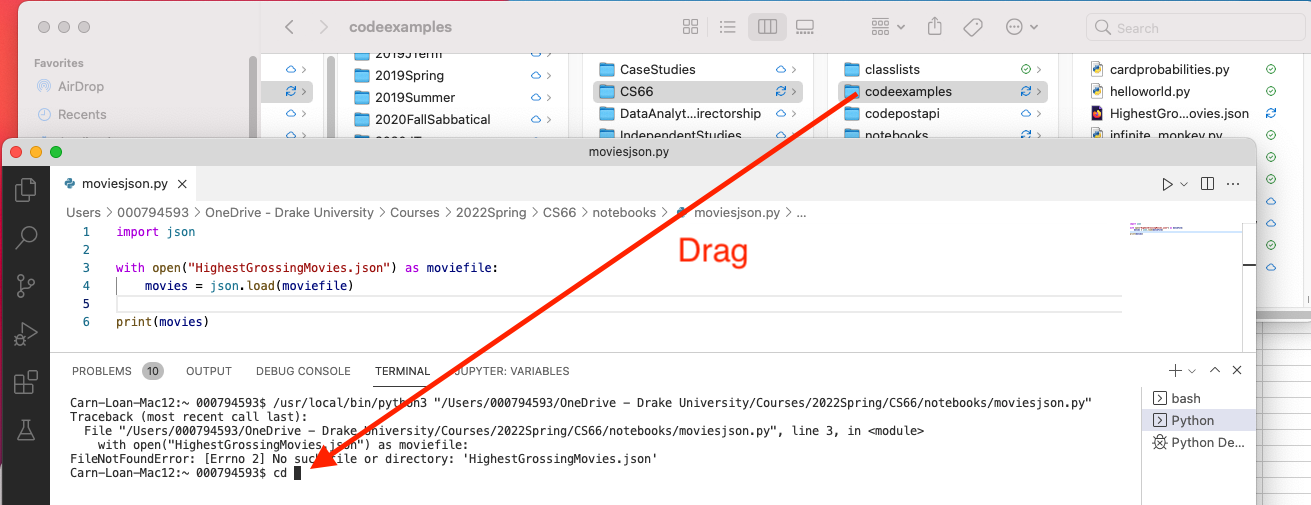
This should fill in the path to that directory, and then when you hit enter, you should see that the terminal is set to that directory’s name.

Now you should be able to run the program as normal and see the output.
Group Activity Problem 2
For the program above, answer the following questions
- What is the type of the
moviesvariable? - How could you get it to print just the first record? Change the code and run it.
- How could you get it to print the first 5 records? Change the code and run it.
- Describe the structure of the data in
movies- i.e., is it a list of lists? a list of dictionaries? Do the records contain other dictionaries in them? Do records contain lists? What are the types of the keys and values within each record?
Group Activity Problem 3
Add this code to your file, and run it. Describe what it does.
for m in movies:
    print(m["Title"])
Group Activity Problem 4
Write the code that will print out the title of all movies that contain "Star Wars" in their name.
Hint: You can check if one string is a substring of another with code like
"Star Wars" in "Star Wars: Episode VII - The Force Awakens (2015)"
Group Activity Problem 5
Write the code that will print the names of all comedies (i.e., movies which contain “Comedy” as one of their items in the Genre list).
Group Activity Problem 6
Write the code that will determine which comedy had the highest world sales (note that the file seems to be sorted by domestic sales, not world sales, so you will have to loop through all the records).
Group Activity Problem 7
Write a function called most_popular_in_genre which takes in a list of movie records (in the same format as the movies variable above) and the name of a movie genre and returns the record of the movie from that genre with the highest world sales.
For example, if I call the function like this:
print( most_popular_in_genre(movies,"Comedy") )
it should result in
{'Title': 'Frozen II (2019)', 'Summary': "Anna, Elsa, Kristoff, Olaf and Sven leave Arendelle to travel to an ancient, autumn-bound forest of an enchanted land. They set out to find the origin of Elsa's powers in order to save their kingdom.", 'Distributor': 'Walt Disney Studios Motion Pictures', 'Release Date': 'November 20, 2019', 'Domestic Sales': 477373578, 'International Sales': 972653355, 'World Sales': 1450026933, 'Genre': "['Adventure', 'Animation', 'Comedy', 'Family', 'Fantasy', 'Musical']", 'Runtime': '1 hr 43 min', 'MPAA Rating': 'PG'}
make sure not to refer to the global movies variable inside your function. This function should still work if I copied it into a new .py file and loaded it with a different data set that has the same form (for example, if I used an updated top 1000 movie data set in a few years).
Make sure to save your code for this exercise - we may continue working on it and turn it in for an assignment later.
Working with some real data: Web APIs
Now we’re going to try requesting some JSON data directly from a server on the Internet.
One source for interesting data: Web APIs - application programming interfaces that allow your programmer to access data through http requests.
There are many APIs you can use to build your own applications: NASA, Associated Press, Weather, IMDB, etc.
We’ll try out an easy-to-use API of COVID data: https://covid19api.com/
Documentation here: https://documenter.getpostman.com/view/10808728/SzS8rjbc
Try this to request data about COVID in the US:
import requests

response = requests.get("https://api.covid19api.com/live/country/united-states")

print(response)
Installing modules
When you ran the code above, you may have gotten an error message that said something like
ModuleNotFoundError: No module named 'requests'
which means that your Python installation doesn’t yet have the requests module installed. The good news is that installing packages like this is easy, but it requires you to execute some commands at the Terminal.
Step 1: When you run your Python code in VS Code, you’ll note that the Python executable is the first thing it puts in the command that it issues to your terminal. Here’s an example of what mine looks like (the thing circled in red is the Python command on my computer), but yours will probably look different depending on where Python is installed on your computer.

Step 2: Use the Python command for your computer to run the command
python3 -m pip install requests
This tells Python to use its package installer (pip) to install the requests package. On my computer, it would look like this:

This should go through a process where it downloads and installs a series of packages - you should see output messages and progress bars appearing in the terminal.
Note: If you see a message about your version of pip being out of date, you can probably ignore it. Or, you can try this command to update it (and then you can try re-installing the requests module as you did above).
python3 -m pip install --upgrade pip
Now try the code to access the API again. If the response that you print is
<Response [200]>
Then it means that it worked correctly since 200 is the http code for “it worked”. If you see any other code, it means something went wrong.
import requests

response = requests.get("https://api.covid19api.com/live/country/united-states")

print(response)
You can then access the JSON data transmitted by the response using the response’s .json() method - save this to a variable like this, then go ahead and print it to see what you get.
import requests

response = requests.get("https://api.covid19api.com/live/country/united-states")

data = response.json()
print(data)
Group Activity Problem 8
Explore the data variable you got back. What is the format of this data? How many items did you get back? What do you think this data represents? Write the answers down in your notes.
Group Activity Problem 9
Write the code that will find the record for the most recent COVID numbers from the state of Iowa. To make the problem a little easier, you can assume that the entries are sorted by date - so the last Iowa record will be the most recent.
Group Activity Problem 10
Now we’re going to try accessing some different data from the same Web API service. Notice that the code below is the same, but it uses a different web address - these different web addresses are called endpoints of the API.
import requests

response = requests.get("https://api.covid19api.com/summary")

data = response.json()
print(data)
Discuss the format of this data - it’s not the same as with the other endpoint. This is an example where it’s not just a list of dictionaries like we’ve seen before. What is the type of the outer-most thing (data)? How many countries are represented? Write the answers in your notes.
Group Activity Problem 11
Write the code that will use the https://api.covid19api.com/summary endpoint to display the number of new deaths from COVID in the United States of America.
Group Activity Problem 12
Use the COVID API documentation to find another endpoint you could use.
https://documenter.getpostman.com/view/10808728/SzS8rjbc
Try it out with your code. Discuss what data you’re getting from this endpoint and write it down in your notes.